Check generated product images
A pass or stop for each AI product image, naming any wrong size, colour, text, logo, warning or extra part, and the AI label and metadata for images that pass.
Built on: Document reader, Consent gate, Content credentials, Signed record
Check and disclosure
LivePick a sample and run it. A check takes 20 to 40 seconds: two images are read by the model, the pack text by the document reader.
Watch a recorded run first
Watch: AI product images checked against the real product
Replay · not liveRecorded from real runs on 30 Sep 2026 on production decosa-api (api.decosa.ai; Qwen3.8-27B through our gateway with receipts, the document reader on the same host). The products and people are made up; the scenes were drawn by Wan2.2-VACE-Fun-A14B around synthetic packs.
A supplement jar on a kitchen shelf, drawn by an image model around the real pack. The quantity, pack text, colour, logo and count all match the product photo, so it is approved: IPTC metadata and a C2PA credential, no label (no person, no rule asks for one).
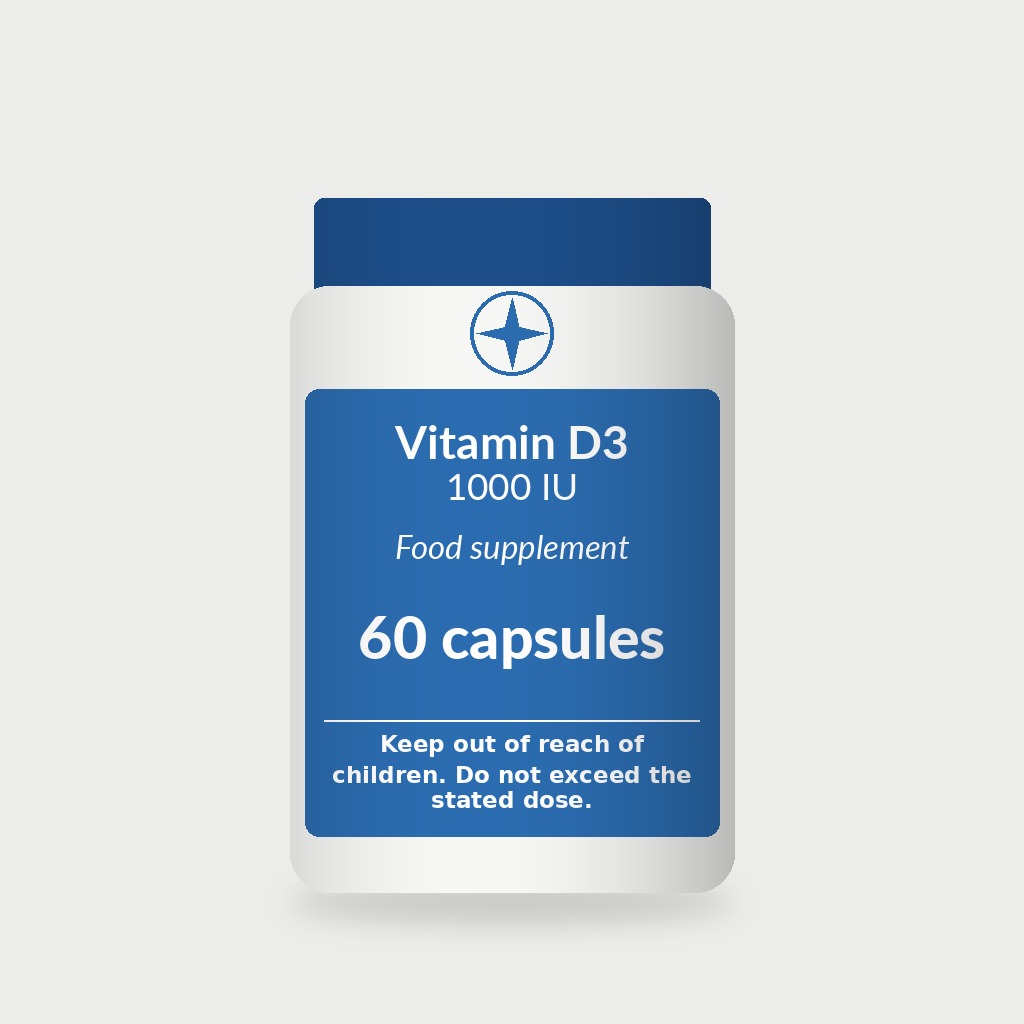
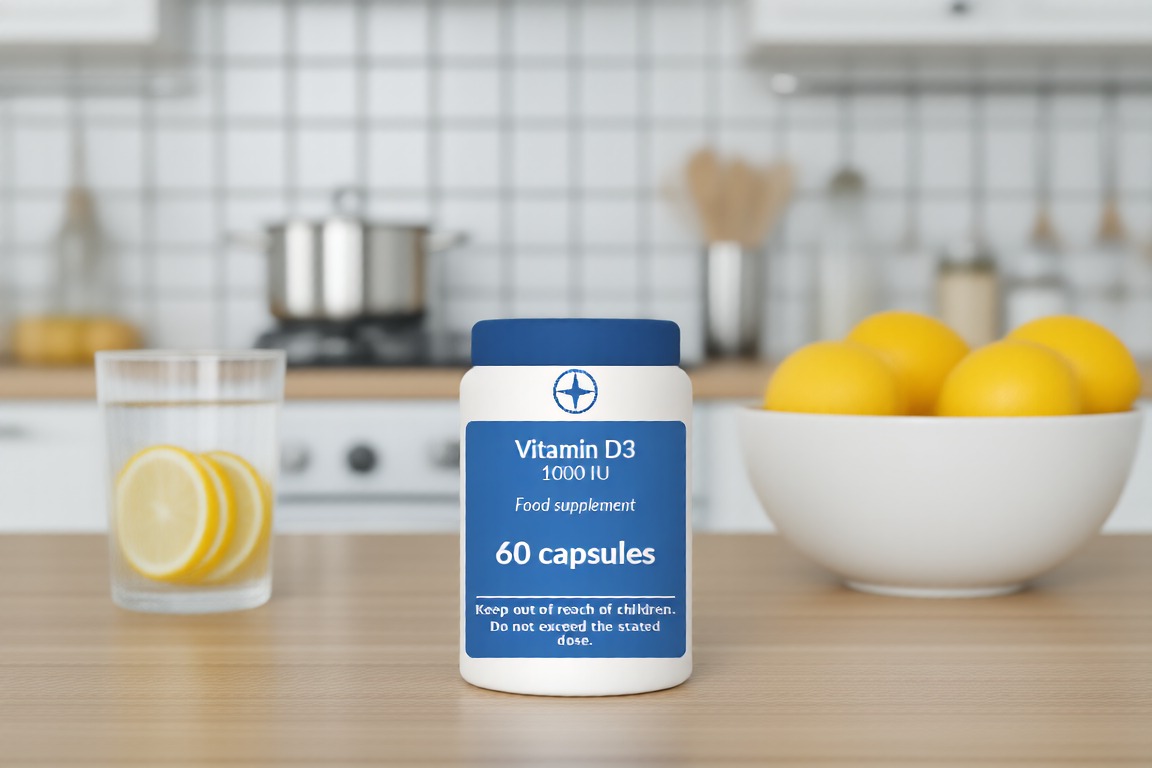
Pick a sample and run it. A check takes 20 to 40 seconds: two images are read by the model, the pack text by the document reader.
Use it your way
Use it from your codeThe hosted API with your key, and prompts to paste into a coding agent
Get an API key
- Call the honest product imagery API from your own code in minutes.
- Every model answer carries a signed receipt.
- Nothing to install; we run the models.
Run it yourself, on request
- The same open models and app, on 1x RTX PRO 6000 (96 GB) for Qwen3.8-27B with its vision tower; the document reader's layout model and parser run beside it; the checks, credential and record on CPU.
- Data never leaves your machines, and there are no Decosa charges.
- One prompt for Claude Code or Codex assembles the whole stack.
- Early access: the container images are not public yet and the source needs access; the prompt says how to ask.
Build with it
Paste one of these into Claude Code, Codex or another coding agent. The first wires your project to the hosted API with your DECOSA_API_KEY. The second pulls our containers and runs the same stack on your own GPU, with no Decosa charges.
- Base URL
- https://api.decosa.ai
- Auth
Authorization: Bearer $DECOSA_API_KEY(or a demo session token)- Tool id
- honest-product-imagery
Use the hosted API
# Decosa honest product imagery: use the hosted API

You are wiring Decosa's honest product imagery check into this project (a product-image pipeline, a listing tool or an
agency's delivery step). It compares an AI-made product or lifestyle image with photos of the real product (net quantity
and count, colour, pack text and claims, logo, warnings, and parts or extra units the product does not have), refuses any
image with a person in it unless each person is a consent-ledger identity whose consent covers this advertising use, and
for an image that passes returns a JPEG with IPTC AI metadata, a label where a rule asks for a visible one, a C2PA
credential and a signed record. Use only what is listed below. If you need something else, stop and ask me.

- Base URL: `https://api.decosa.ai`
- Health check: `GET https://api.decosa.ai/healthz`.
- It is an automated check and a disclosure pack, not legal advice. Never call a listing or ad "compliant". A person should
  look at every flagged image and a sample of the passing ones.
- It checks images; it does not generate them. Use images you have the right to upload. The hosted demo takes fictional
  `id_demo-*` people only; never send a real person's likeness to the demo.

## Auth: API key (or a demo session)
1. Preferred: an API key (`dk_…`) from "Get an API key" on the tool page, kept in `DECOSA_API_KEY`, never in code.
   Send `Authorization: Bearer $DECOSA_API_KEY`.
2. Without a key: `POST https://api.decosa.ai/demo/session` with `{"vertical": "honest-product-imagery"}` returns `{"token",
   "expires_at", "budget"}`. A demo token runs one run at a time (409); sessions per IP are limited (429 with `Retry-After`).

## Endpoints
- `POST /imagery/runs` (token). Body: `{"reference_b64": ["<1 to 3 photos of the real product, JPEG/PNG/WebP, ≤10 MB each>"],
  "image_b64": "<the AI image>", "facts"?: {"name", "brand", "net_quantity", "claims": [], "warnings": [], "features": [],
  "included": []}, "people"?: [{"identity_id": "id_...", "label"?}], "project"?: "<slug, required with people>",
  "territory"?: "US", "targets"?: ["amazon", "google-merchant", "etsy", "meta", "US-NY", "EU"], "role"?: "main"|"lifestyle"|"ad",
  "generation"?: "generated"|"composite", "image_model"?: "<the generator's name>", "units_sold"?: 1-24,
  "visible_label"?: bool, "accept_warnings"?: bool, "stream"?: bool}`, or `{"sample": "<id>"}`.
  - JSON response: `{run_id, status: "approved"|"needs_review"|"not_approved"|"consent_refused", verdict: "pass"|"review"|"fail"|null,
    image_url, export, report, receipts, budget}`. `report.check.violations` and `.warnings`:
    `[{category: size|colour|text|logo|warning|feature, source, why}]`; `report.consent.decisions`; `report.disclosure`
    (one row per target or rule with `status`, `applied`, `seller_action`, `source`).
  - SSE (`"stream": true`): `ready`, `stage`, `receipt`, `locate`, `consent`, `pixels`, `text`, `compare`, `check`, `label`,
    `credential`, `disclosure`, `report`, `done`, `budget`.
- `GET /imagery/runs/{run_id}/image` (the approved JPEG, same token, one hour), `GET /imagery/runs/{run_id}[/export?format=json|record]`,
  `POST /record/verify` `{"record"}`, `GET /imagery/info`, `GET /imagery/samples`.

## Example: check a batch before upload (Python, `pip install httpx`)
```python
import base64, httpx, os, pathlib
API = "https://api.decosa.ai"
H = {"Authorization": f"Bearer {os.environ['DECOSA_API_KEY']}"}
b64 = lambda p: base64.b64encode(open(p, "rb").read()).decode()
refs = [b64("product/front.jpg"), b64("product/back.jpg")]
facts = {"name": "Hand Wash, Cedar & Sage", "net_quantity": "500 ml", "warnings": ["For external use only. Avoid contact with eyes."]}
for img in pathlib.Path("ai-images").glob("*.jpg"):
    r = httpx.post(f"{API}/imagery/runs", headers=H, timeout=300,
                   json={"reference_b64": refs, "image_b64": b64(img), "facts": facts, "targets": ["amazon", "google-merchant", "EU"]}).json()
    if r["status"] != "approved":
        print(img.name, r["status"], [(f["category"], f["why"]) for f in (r["report"].get("check") or {}).get("violations", [])])
        continue
    pathlib.Path("approved", img.name).write_bytes(httpx.get(API + r["image_url"], headers=H).content)   # keep it as delivered
```
Run it yourself (containers)
On request. The container images and the compose file aren’t public yet. Ask for self-host access and Decosa sends the registry (DECOSA_REGISTRY) and the compose file’s URL (DECOSA_COMPOSE_URL) these steps use. They are the steps we tested end to end on a fresh machine.
# Decosa honest product imagery: run it yourself (containers)

You are setting up Decosa's honest product imagery check on this machine, so unreleased products and model shoots never
leave it. It compares an AI image with photos of the real product (quantity, colour, pack text, logo, warnings, extra
features), refuses images with a person whose consent does not cover the use, and for an image that passes writes IPTC AI
metadata, a label where a rule asks for one, a C2PA credential and a signed record. Nothing is sent to Decosa's hosted API.
It is an automated aid, not legal advice, and it does not generate images.

Status: the container images (${DECOSA_REGISTRY}/decosa-*) and the compose file are on request while self-host is in early access (not on a public registry yet): ask at https://decosa.ai/contact?topic=self-host, and Decosa sends the registry as DECOSA_REGISTRY, the compose file URL as DECOSA_COMPOSE_URL, and pull access. If a pull fails with
"not found", "denied" or "unauthorized", stop and tell me. Do not substitute other images.

Ask me before any command that needs sudo, and show me the command first.

## Step 0: set up with a coding agent, rehearse on mock data, then go private

This prompt is for a coding agent running on the machine that will host the service. We recommend Claude Code with
Claude Opus 5.5; any capable coding agent works. Work in this order:

1. Set up on mock data only. During the whole setup you (the agent) work with the synthetic sample bundle below and
   nothing else. Do not ask me for real data, and do not open, read, list or copy files that hold real data, even to
   "test with something realistic".
2. Rehearse. When the steps below are done and the service is healthy, fetch the mock-data bundle for this tool,
   https://decosa.ai/samples/honest-product-imagery.zip (404 KB, 11 checks, synthetic or openly licensed: see `licence` in expected.json),
   show me what is in it, and run the rehearsal against the local API:
   `docker compose exec api python scripts/rehearse.py honest-product-imagery` (the api image carries the same bundle under /app/rehearsal/honest-product-imagery/;
   with no key set, the script asks the local API for a short demo token). From a decosa-api checkout instead:
   `python scripts/rehearse.py honest-product-imagery --bundle honest-product-imagery.zip --base-url http://127.0.0.1:<PORT>`.
   It sends the mock inputs to the local API and prints PASS or FAIL for each expected property (for example: "the 750 ml image is not approved", "the size misrepresentation is named", "no image is released for it"). Show me
   the full output. Every check must pass. If one fails, fix the install and run it again; never edit `expected.json`
   to make a check pass.
3. Stop there. Once the rehearsal passes, tell me, and I will run my own data against the local API myself, on this
   machine.

For the person running this: a coding agent that runs in the cloud sees everything in its context, including files it
reads, command output and anything pasted into the chat. Keep real data out of the chat and out of anything the agent
can read. Switch to your own data only after the rehearsal has passed and the agent's work is done.

## Steps
1. Docker: if `docker compose version` fails, install Docker Engine and the compose plugin using Docker's official
   instructions (docs.docker.com/engine/install). Install the NVIDIA container toolkit and check
   `docker run --rm --gpus all nvidia/cuda:12.8.0-base-ubuntu24.04 nvidia-smi`.
2. Fetch the compose file: `mkdir -p ~/decosa && cd ~/decosa && curl -fsSL "${DECOSA_COMPOSE_URL}" -o compose.yaml`. Keep the
   `llm` and `api` services. The `llm` service must serve the model **with** its vision tower: remove
   `--language-model-only` if present and add `--limit-mm-per-prompt '{"image":4,"video":0}'`. On the `api` set
   `DECOSA_LLM_ROUTE=direct`, `DECOSA_LLM_URL=http://llm:8000/v1`, `DECOSA_LLM_MODEL=qwen3.8-27b`,
   `DECOSA_PROVENANCE_DIR=/provenance` (a named volume), and bind every port to 127.0.0.1. Never set the gateway route on
   this box.
3. The document reader (pack text): add the `parser` (PaddleOCR-VL-1.6 in vLLM) and `docreader` services from
   {{SITE_URL}}/prompts/honest-product-imagery-assemble.md, step 3, and set `DECOSA_DOCREADER_URL=http://docreader:8497`
   on the api. Without it the check still runs, but printed quantities, claims and warnings are judged by the model only.
4. Create the C2PA signing material once: `docker compose run --rm api python scripts/provenance_devcert.py`.
5. Pull and start: `docker compose pull && docker compose up -d`; wait for the health checks.
6. Smoke test: `docker compose exec api python scripts/rehearse.py honest-product-imagery --base-url http://127.0.0.1:8445`
   must pass (a 750 ml label on a 500 ml product not approved, a person with no identity refused, a faithful image
   approved with IPTC metadata and a C2PA credential, its record verifies, every receipt `attested`).
7. Your own models: enrol each model's consent in the consent ledger (`POST /consent/entries`: scope, purpose
   `advertising`, projects, territories, pay, duration) and pass the ids as `people` with the `project`.
8. Report back: `GET /attest/signing-key`, the rehearsal result and how long a check took.

Off by default. Joining as a provider serves other people's requests on this GPU; never do it on a box that holds
unreleased product images. If I ask for it later, follow the Provide page instead of improvising.
Run it on your own hardwareWhat it needs, and the prompt that sets it up
Run it on your own GPU
Same app, same pinned models, your hardware. Nothing goes to our servers and there are no Decosa charges.
Hardware check
Check your own hardware- CPU only, 64 GB RAMDoesn't fit
Qwen3.8-27B (NVIDIA NVFP4) needs a GPU.
- GeForce RTX 4090lite tierRuns with a smaller tier
The standard tier does not fit: Needs about 25.4 GB of GPU memory at the smallest settings; 24 GB available. The lite tier fits with changes.
- GeForce RTX 5090lite tierRuns with a smaller tier
The standard tier does not fit: Needs about 33.4 GB of GPU memory at the smallest settings; 32 GB available. The lite tier fits with changes.
- 2x GeForce RTX 5090standard tierRuns
The standard tier fits with changes: Qwen3.8-27B (NVIDIA NVFP4): run it at its smallest setting (about 28 GB instead of 57.6 GB), with a shorter context and fewer parallel sessions.
- L40Sstandard tierRuns
The standard tier fits with changes: Replace Qwen3.8-27B (NVIDIA NVFP4) with Qwen3.8-27B official FP8. This build is NVIDIA NVFP4, which needs a Blackwell GPU.
- H100 80 GB (SXM)standard tierRuns
The standard tier fits with changes: Replace Qwen3.8-27B (NVIDIA NVFP4) with Qwen3.8-27B official FP8. This build is NVIDIA NVFP4, which needs a Blackwell GPU.
- RTX PRO 6000 Blackwell 96 GBstandard tierRuns
The standard tier fits (63 of 96 GB).
- 2x RTX PRO 6000 Blackwell 96 GBstandard tierRuns
The standard tier fits (63 of 192 GB).
- Apple M3 Ultra (Mac Studio), 96 GBlite tierRuns with a smaller tier
The standard tier can't be checked: Docling 2.130 with the Heron layout model has no mapped Apple Silicon build The lite tier fits with changes.
- Apple M5 Max, 64 GBlite tierRuns with a smaller tier
The standard tier can't be checked: Docling 2.130 with the Heron layout model has no mapped Apple Silicon build The lite tier fits with changes.
Memory per component comes from measured footprints, the tool's stack.json, or an estimate from its parameter count, and each is labelled that way below. Only an RTX PRO 6000 and an M3 Ultra Mac Studio have actually been run.
On request. The container images and the compose file aren’t public yet. Ask for self-host access and Decosa sends the registry (DECOSA_REGISTRY) and the compose file’s URL (DECOSA_COMPOSE_URL) these steps use. They are the steps we tested end to end on a fresh machine.
- 1
Check the GPU, Docker and the NVIDIA Container Toolkit
The driver must see the GPU, and Docker must be able to pass it into a container.
nvidia-smi
docker compose version
docker run --rm --gpus all ubuntu nvidia-smi
- 2
Fetch the compose file
One file describes the API and the language model as services.
mkdir -p ~/decosa && cd ~/decosa curl -fsSL "${DECOSA_COMPOSE_URL}" -o compose.yaml - 3
Pull and start
The first start downloads pinned model weights, tens of gigabytes.
docker compose pull
docker compose up -d
- 4
Check health
Wait until the API reports ok with the language model loaded. Then point your app at the local base URL.
curl -fsS http://localhost:<PORT>/healthz
# {"ok": true, "llm": true, ...}
curl -fsS -X POST http://localhost:<PORT>/demo/session \
  -H 'Content-Type: application/json' -d '{"vertical":"honest-product-imagery"}'
Set up with a coding agent, rehearse on mock data, then go private
- Set up with a coding agent. Paste the self-host prompt into a coding agent on the machine that will run the service. We recommend Claude Code with Claude Opus 5.5; any capable coding agent works.
- Rehearse on mock data. The agent runs the tool on a bundle of synthetic inputs and checks each answer against the bundle's
expected.json. Every check must print PASS. - Go private. Only then do you run your own data against the local API, yourself, on that machine. Never give the agent real data during setup: a coding agent that runs in the cloud sees everything in its context, so keep real data out of the chat and out of the files it reads.
docker compose exec api python scripts/rehearse.py honest-product-imagery
Download the mock-data bundle (404 KB, 11 checks)expected.json
Three made-up products (a hand-wash bottle, a drink can and a vitamin jar), each with the seller's own packshot. An AI lifestyle image of the bottle whose label says 750 ml must be not approved with a size violation. An AI ad image of the can with a person in it and no consent-ledger identity must be refused by the consent gate before any comparison. A faithful AI lifestyle image of a vitamin jar must be approved with the IPTC DigitalSourceType in XMP, a C2PA credential and a signed record that verifies, and fails once the image hash in the record is changed.
What the rehearsal checks
- the 750 ml image is not approved
- the size misrepresentation is named
- no image is released for it
- a person with no consent record is refused
- the refusal comes before the comparison (two locate calls only)
- the faithful image is approved
- it carries the IPTC DigitalSourceType Google and others read
- it carries a C2PA credential
- the record verifies
- a record with the image hash changed no longer verifies
- every model call has a signed receipt
Licence: Synthetic products and brands made up for Decosa; packshots drawn with Pillow (Lato, SIL OFL 1.1; DejaVu fonts); scenes drawn by Wan2.2-VACE-Fun-A14B (Apache-2.0) in decosa-api, 27 Sep 2026. Part of decosa-api, AGPL-3.0-or-later.
Prompt for your coding agent
# Decosa honest product imagery: run it yourself (containers)

You are setting up Decosa's honest product imagery check on this machine, so unreleased products and model shoots never
leave it. It compares an AI image with photos of the real product (quantity, colour, pack text, logo, warnings, extra
features), refuses images with a person whose consent does not cover the use, and for an image that passes writes IPTC AI
metadata, a label where a rule asks for one, a C2PA credential and a signed record. Nothing is sent to Decosa's hosted API.
It is an automated aid, not legal advice, and it does not generate images.

Status: the container images (${DECOSA_REGISTRY}/decosa-*) and the compose file are on request while self-host is in early access (not on a public registry yet): ask at https://decosa.ai/contact?topic=self-host, and Decosa sends the registry as DECOSA_REGISTRY, the compose file URL as DECOSA_COMPOSE_URL, and pull access. If a pull fails with
"not found", "denied" or "unauthorized", stop and tell me. Do not substitute other images.

Ask me before any command that needs sudo, and show me the command first.

## Step 0: set up with a coding agent, rehearse on mock data, then go private

This prompt is for a coding agent running on the machine that will host the service. We recommend Claude Code with
Claude Opus 5.5; any capable coding agent works. Work in this order:

1. Set up on mock data only. During the whole setup you (the agent) work with the synthetic sample bundle below and
   nothing else. Do not ask me for real data, and do not open, read, list or copy files that hold real data, even to
   "test with something realistic".
2. Rehearse. When the steps below are done and the service is healthy, fetch the mock-data bundle for this tool,
   https://decosa.ai/samples/honest-product-imagery.zip (404 KB, 11 checks, synthetic or openly licensed: see `licence` in expected.json),
   show me what is in it, and run the rehearsal against the local API:
   `docker compose exec api python scripts/rehearse.py honest-product-imagery` (the api image carries the same bundle under /app/rehearsal/honest-product-imagery/;
   with no key set, the script asks the local API for a short demo token). From a decosa-api checkout instead:
   `python scripts/rehearse.py honest-product-imagery --bundle honest-product-imagery.zip --base-url http://127.0.0.1:<PORT>`.
   It sends the mock inputs to the local API and prints PASS or FAIL for each expected property (for example: "the 750 ml image is not approved", "the size misrepresentation is named", "no image is released for it"). Show me
   the full output. Every check must pass. If one fails, fix the install and run it again; never edit `expected.json`
   to make a check pass.
3. Stop there. Once the rehearsal passes, tell me, and I will run my own data against the local API myself, on this
   machine.

For the person running this: a coding agent that runs in the cloud sees everything in its context, including files it
reads, command output and anything pasted into the chat. Keep real data out of the chat and out of anything the agent
can read. Switch to your own data only after the rehearsal has passed and the agent's work is done.

## Steps
1. Docker: if `docker compose version` fails, install Docker Engine and the compose plugin using Docker's official
   instructions (docs.docker.com/engine/install). Install the NVIDIA container toolkit and check
   `docker run --rm --gpus all nvidia/cuda:12.8.0-base-ubuntu24.04 nvidia-smi`.
2. Fetch the compose file: `mkdir -p ~/decosa && cd ~/decosa && curl -fsSL "${DECOSA_COMPOSE_URL}" -o compose.yaml`. Keep the
   `llm` and `api` services. The `llm` service must serve the model **with** its vision tower: remove
   `--language-model-only` if present and add `--limit-mm-per-prompt '{"image":4,"video":0}'`. On the `api` set
   `DECOSA_LLM_ROUTE=direct`, `DECOSA_LLM_URL=http://llm:8000/v1`, `DECOSA_LLM_MODEL=qwen3.8-27b`,
   `DECOSA_PROVENANCE_DIR=/provenance` (a named volume), and bind every port to 127.0.0.1. Never set the gateway route on
   this box.
3. The document reader (pack text): add the `parser` (PaddleOCR-VL-1.6 in vLLM) and `docreader` services from
   {{SITE_URL}}/prompts/honest-product-imagery-assemble.md, step 3, and set `DECOSA_DOCREADER_URL=http://docreader:8497`
   on the api. Without it the check still runs, but printed quantities, claims and warnings are judged by the model only.
4. Create the C2PA signing material once: `docker compose run --rm api python scripts/provenance_devcert.py`.
5. Pull and start: `docker compose pull && docker compose up -d`; wait for the health checks.
6. Smoke test: `docker compose exec api python scripts/rehearse.py honest-product-imagery --base-url http://127.0.0.1:8445`
   must pass (a 750 ml label on a 500 ml product not approved, a person with no identity refused, a faithful image
   approved with IPTC metadata and a C2PA credential, its record verifies, every receipt `attested`).
7. Your own models: enrol each model's consent in the consent ledger (`POST /consent/entries`: scope, purpose
   `advertising`, projects, territories, pay, duration) and pass the ids as `people` with the `project`.
8. Report back: `GET /attest/signing-key`, the rehearsal result and how long a check took.

Off by default. Joining as a provider serves other people's requests on this GPU; never do it on a box that holds
unreleased product images. If I ask for it later, follow the Provide page instead of improvising.
Help me customise for my hardware
Pick your GPU or Mac, or enter its memory. You get the tier that fits, the model swaps it needs, measured speed where we have it, and a setup prompt with those choices written in.
GeForce RTX 5090: 32 GB GDDR7, 1,792 GB/s, FP8 and NVFP4. NVIDIA product page
Runs with a smaller tierHonest product imagery on GeForce RTX 5090: use the Lite · pixels and the model, no document reader tier
The standard tier does not fit: Needs about 33.4 GB of GPU memory at the smallest settings; 32 GB available. The lite tier fits with changes.
Lite · pixels and the model, no document reader: what changesuses estimates
- Qwen3.8-27B (NVIDIA NVFP4): run it at its smallest setting (about 28 GB instead of 57.6 GB), with a shorter context and fewer parallel sessions.
Memory per component
- Finds the product units, the logo and label,...: Qwen3.8-27B (NVIDIA NVFP4). ~57.6 GB (at least ~28 GB), weights 21.4 GB (from stack.json). Qwen3.8-27B NVFP4: Weights 19.9 GiB (21.4 GB), measured (field stack.json). The compose file gives the server 0.60 of a 96 GB card (57.6 GB) so the rest is FP8 KV cache for several sessions. The 28 GB minimum is an estimate: weights plus a short-context KV cache, which is why several stacks list a 32 GB RTX 5090 as 'estimate'. (stack.json lists 57 GB for this component.)
- Alignment: decosa-api imagery module (decosa_api/verticals/imagery). CPU. Runs on CPU (vram_gb 0 in stack.json).
Expected speed
Not measured.
Not measured on this hardware. The only measured setups are an RTX PRO 6000 Blackwell and a Mac Studio M3 Ultra.
Setup prompt for this hardware
The self-host prompt for Honest product imagery, with a hardware plan for GeForce RTX 5090 added after Step 0. Loading the full prompt; until then it points your agent at the prompt's URL.
# Set up Honest product imagery on my hardware

Fetch https://decosa.ai/prompts/honest-product-imagery-selfhost.md and follow it (including Step 0: rehearse on mock data first), with the hardware plan below applied.

## Hardware plan for this machine (from https://decosa.ai/self-host/hardware?use=honest-product-imagery)

Target machine: GeForce RTX 5090 (32 GB of GPU memory; CUDA, FP8 and NVFP4).
Quality tier: Lite · pixels and the model, no document reader (lite). Fit check: runs with changes, about 28 GB of 32 GB used; some memory numbers are estimates, not measurements.

First, check the machine: run `nvidia-smi` (or `rocm-smi`, or `sysctl hw.memsize` on a Mac) and confirm the GPUs and free memory match the line above. If they do not, stop and tell me before pulling anything.

Use these components (the setup below describes the standard tier; change it to match):
- Finds the product units, the logo and label,...: Qwen3.8-27B (NVIDIA NVFP4) (nvidia/Qwen3.8-27B-NVFP4), 57.6 GB. Change: Qwen3.8-27B (NVIDIA NVFP4): run it at its smallest setting (about 28 GB instead of 57.6 GB), with a shorter context and fewer parallel sessions.
- Alignment: decosa-api imagery module (decosa_api/verticals/imagery), CPU

GPU placement (set each service's device and its vLLM --gpu-memory-utilization to about the share shown):
- GPU 0: Qwen3.8-27B (NVIDIA NVFP4) ~28 GB (88%); about 4 GB left

During the rehearsal, watch GPU memory. If a model fails to load or runs out of memory, lower its --max-model-len and --max-num-seqs first, then its memory share, and tell me what you changed.

The stack's own component list and compose layout: https://decosa.ai/prompts/honest-product-imagery-assemble.md
The proof
How we tested itEval results and end-to-end checks, hosted and self-hosted, with dates
Verified end to end
Hosted: verified 27 Sep 2026 · measured 27 Sep 2026: · p50 13 s · ~$0.002 per run · 10 receipts
Loading the nightly status…
Self-host: verified 27 Sep 2026 · Fresh clone of the branch into a clean directory, docker build of the api image (45 s), the api with named volumes on host networking against the running local Qwen3.8-27B (vision, direct route) and document reader, the C2PA dev certificate from the prompt's step; then torn down.
Measured cost to run: about $0.21 per 100 images (hosted, 27 Sep 2026, partly estimated). Self-hosting is free: the code is open and the models are open-weight. You pay only for your own hardware and power.
The rehearsal bundle passed 11 of 11 in 17 s (750 ml refused, a person without consent refused after two calls, a faithful image approved with IPTC metadata and a C2PA credential, the record verifies and a tampered copy fails); receipts attested; no product text in the logs. The first try without the C2PA step approved the image with no credential, which the bundle caught. The model and document-reader servers' own startup was not re-verified (no new GPU load).
Known limits (5)
- Hosted verification ran on the pre-release server (decosa-api the pre-release branch on our server, gateway route); production gets this tool when the branch merges.
- Measured on six made-up products with scenes drawn by one image model; real product photos and other generators were not tested.
- The alignment handles upright shots and small tilts; strong perspective or a product held at an angle skips the colour and logo checks.
- A generated hand or body part counts as a person, so it needs an identity (a synthetic performer can be enrolled as a fictional identity).
- The C2PA credential uses a development certificate; public validators show it as untrusted.
How it's builtThe steps, the models and what each one checks
Get an API key
- Call the honest product imagery API from your own code in minutes.
- Every model answer carries a signed receipt.
- Nothing to install; we run the models.
Run it yourself, on request
- The same open models and app, on 1x RTX PRO 6000 (96 GB) for Qwen3.8-27B with its vision tower; the document reader's layout model and parser run beside it; the checks, credential and record on CPU.
- Data never leaves your machines, and there are no Decosa charges.
- One prompt for Claude Code or Codex assembles the whole stack.
- Early access: the container images are not public yet and the source needs access; the prompt says how to ask.
Check an AI-made product or lifestyle image against the real product, stop it if a person in it has no consent for this ad, and ship the AI label and metadata each marketplace asks for, with a C2PA credential and a signed record.
Send photos of the real product, the AI image and, optionally, what the product is (net quantity, claims, warnings, features). Code measures the colour difference in Lab after a white balance, reads the pack text with the document reader, matches the logo and counts units; Qwen3.8-27B compares the two images per category. A misrepresentation (750 ml for a 500 ml bottle, a shifted colour, a changed claim, a redrawn logo, a missing warning, a pump or extra unit the product lacks) stops the image. Any person in it must be a consent-ledger identity whose consent covers this advertising use. An image that passes gets IPTC metadata, a label where New York or the EU asks for one, a C2PA credential and a signed record. For e-commerce sellers, DTC brands and the agencies that make their images.
- Deployment
- Hosted or self-host
- Regulatory
- Not legal advice or a determination that a listing or ad is lawful; sources read on the primary pages on 27 Sep 2026 unless marked. Misrepresentation: FTC Act s.5 and the FTC Policy Statement on Deception (14 Oct 1983, https://www.ftc.gov/legal-library/browse/ftc-policy-statement-deception); EU Unfair Commercial Practices Directive 2005/29/EC Art. 6(1)(b) (main characteristics such as composition, accessories, quantity; https://eur-lex.europa.eu/legal-content/EN/TXT/HTML/?uri=CELEX:32005L0029). AI marking and deep fakes: EU AI Act (Regulation (EU) 2024/1689) Art. 50(2) and 50(4), applying from 2 Aug 2026 (Art. 113); generators on the market before that date have until 2 Dec 2026 for 50(2) (Art. 111(4), added by Regulation (EU) 2026/1744, OJ 24 Jul 2026). Synthetic performers: New York GBL s.396-b (https://www.nysenate.gov/legislation/laws/GBS/396-B) requires an advertiser with actual knowledge to disclose a synthetic performer conspicuously; in force from 9 Jun 2026 per the disclosure pre-flight's reading of chapter 617 of 2025 (exact date not re-verified). Model consent: New York Fashion Workers Act, Labor Law Art. 36, s.1037(7) (clear and conspicuous prior written consent to create or use a model's digital replica, stating scope, purpose, rate of pay and duration; https://www.nysenate.gov/legislation/laws/LAB/1037), effective 19 Jun 2025 per the NY Department of Labor FAQ. Marketplaces: Amazon's product image guide (G1881) asks images to represent the product accurately and to tag photorealistic AI-generated people (keyword contains-synthetic-performer); Google Merchant Center asks for AI metadata such as IPTC DigitalSourceType TrainedAlgorithmicMedia; Etsy's Creativity Standards (10 Jun 2025) require disclosure for items made with AI, not for AI photos of real items; Meta labels images carrying C2PA or IPTC AI indicators, and whether it requires AI disclosure in ads outside political and social-issue ads was not verified. Model licences: Apache-2.0 (Qwen3.8-27B, PaddleOCR-VL-1.6, the Heron layout weights), MIT (Docling).
Text description
Photos of the real product, the AI image to check, optional product facts and the people in it (consent-ledger ids) go to decosa-api, which can run on your own machine. Qwen3.8-27B (Apache-2.0) finds the product, its logo and any people in both images. The consent gate checks every person against the consent ledger for this project and advertising use and stops the image when a consent is missing, for another campaign, withdrawn or expired. Code aligns the product with the reference and measures colour (CIEDE2000), the logo and the number of units; the document reader (Docling layout and PaddleOCR-VL-1.6) reads the pack text for quantities, claims and warnings; Qwen3.8-27B compares the two images per category. Direct measurements fail an image on their own; the model alone only raises a warning. An image that passes gets IPTC metadata, a label where New York s.396-b or EU AI Act Art. 50(4) asks for one, a C2PA credential and a signed record. Hosted model calls get gateway receipts, countersigned.
At a glance
- What it checks
- Net quantity and count, product colour, pack text and claims, the logo, warnings, and parts, accessories or extra units the product does not have, against your own product photos and the facts you state. Any person or human likeness in the image needs a consent-ledger identity whose consent covers this advertising use.
- What it does not do
- It does not generate images, give legal advice or say a listing or ad is lawful. It cannot know about a product change you did not tell it about. It misses small warning or claim text that the image model garbled: in the eval it passed all 17 such images (a frontier model caught 15). It does not identify people: it only checks the identities you name.
- Data retention
- Images are held in memory and a temporary folder for the run and deleted when it ends; an approved image is kept with the run for one hour for the token or key that made it, so you can download it. Consent decisions on the demo go to a private in-memory ledger. Logs carry ids, verdicts and counts, never images or product facts.
- What leaves the box (hosted demo)
- The images go to Qwen3.8-27B through our gateway and to the document reader service, both operated by Decosa. Self-hosted, nothing leaves the machine.
- Cost per image
- A fraction of a cent of model calls for a full check (a few image calls) and less for a consent refusal, at the gateway list price (measured).
- Output
- A verdict with each misrepresentation found and how, the consent decisions, the disclosure per marketplace or law with its source, the approved JPEG with IPTC metadata (and Amazon's synthetic-performer keyword when it applies), a burned-in label where one is required, a C2PA credential, and a signed record (verify at /record/verify).
Pick the tier for the quality you need
Same app at every tier. What changes is the models, the hardware they need, and whether receipts are signed. Scores are measured with the source named, or marked not measured.
Lite
pixels and the model, no document reader
Alignment, colour, logo and unit checks in code plus the model's comparison; the quantity, claim and warning text is judged by the model only, so those findings stay warnings.
- Models
- Qwen3.8-27B (NVIDIA NVFP4)
- decosa-api imagery module (decosa_api/verticals/imagery)
- Hardware
- 1x RTX 5090 32 GB for the model (not measured) or the hosted gateway
- Quality evidence
- not measured as a separate tier (the standard tier was measured)not measured yetdecosa-api docs/evals/honest-product-imagery.md
- Latency
- estimate: three image calls per check
- Verification
- Proof: strongSelf-host onlyGateway receipt per image call on the hosted route.
- In the hosted demo
Standard
pixels, pack text and the model (hosted demo)
Adds the document reader: printed quantities, claims and warnings compared in code, so a 750 ml label on a 500 ml product fails without the model's say-so.
- Models
- Qwen3.8-27B (NVIDIA NVFP4)
- Docling 2.130 with the Heron layout model
- PaddleOCR-VL-1.6 (0.9B)
- decosa-api imagery module (decosa_api/verticals/imagery)
- Hardware
- Qwen3.8-27B on one 96 GB card; the document reader beside it (about 6 GB)
- Quality evidence
- held-out test (thresholds frozen): planted misrepresentations flagged / faithful images flagged48 of 48 (44 refused, 4 for review) / 3 of 24decosa-api docs/evals/honest-product-imagery.md, measured on our server 2026-09-27, gateway route
- Latency
- measured: seconds for a full check under load
- Verification
- Proof: partialModel calls are receipted by the gateway; page parses carry model-call receipts signed by decosa-api (attested).
Also runs on
- Lifestyle scenes for demos (not part of the service)Wan2.2-VACE-Fun-A14Bself-host onlyWan2.2-VACE-Fun-A14B drew the demo and eval scenes around synthetic packs. The service checks images from any generator; it does not generate them. Hardware: shared studio GPU, one job at a time; about 30-45 s per 1152x768 still (measured).
We host these ourselves when needed: small models get more of our own compute unless we detect a shortage, so they need no community providers.
Every model in the stack
| Model | Tiers | Params · VRAM | Verification | Details |
|---|---|---|---|---|
Finds the product units, the logo and label, and every person or human likeness in the reference photo and the AI image; compares the two side by side with the seller's facts, per category (size, colour, text, logo, warning, feature)Qwen3.8-27B (NVIDIA NVFP4)nvidia/Qwen3.8-27B-NVFP4 on Hugging Face (opens in a new tab) 27.8B · 57 GBProof: strongIn the hosted demo | LiteStandard | 27.8B · 57 GB | Proof: strongIn the hosted demo | |
| ||||
Pack text, step 1: finds the text regions on crops of the product (the document reader block)Docling 2.130 with the Heron layout modeldocling-project/docling-layout-heron on Hugging Face (opens in a new tab) 1 GBProof: partialIn the hosted demo | Standard | 1 GB | Proof: partialIn the hosted demo | |
| ||||
Pack text, step 2: reads each region (name, variant, claims, quantity, warnings)PaddleOCR-VL-1.6 (0.9B)PaddlePaddle/PaddleOCR-VL-1.6 on Hugging Face (opens in a new tab) 0.9B · 4.4 GBProof: partialIn the hosted demo | Standard | 0.9B · 4.4 GB | Proof: partialIn the hosted demo | |
| ||||
Alignment (NCC on edges over scale and a few degrees of rotation), colour (CIEDE2000 after white balance on the pack's neutral areas), logo match, unit count, changed pack area, the quantity and text comparisons, the verdict rules, the consent gate, XMP, the burned-in label and its OCR read-back, the C2PA credential and the signed record (no model; CPU)decosa-api imagery module (decosa_api/verticals/imagery) 0 GBProof: partialIn the hosted demo | LiteStandard | 0 GB | Proof: partialIn the hosted demo | |
| ||||
Not part of the service: drew the demo and eval lifestyle scenes around synthetic packs (one job at a time on the shared studio GPU)Wan2.2-VACE-Fun-A14Balibaba-pai/Wan2.2-VACE-Fun-A14B on Hugging Face (opens in a new tab) A14B (two 14B experts, high and low noise) (14B per step active)No proof yetSelf-host only | Alternate | A14B (two 14B experts, high and low noise) (14B per step active) | No proof yetSelf-host only | |
| ||||
Tools, services and hardware
Tools
- decosa consent ledger (tool 47) (opens in a new tab)AGPL-3.0-or-later (decosa-api)
consent.check per person for face / advertising / project / territory / date; signed decisions. The demo uses a private ledger of fictional id_demo-* identities.
- decosa disclosure pre-flight (tool 49) (opens in a new tab)AGPL-3.0-or-later (decosa-api)
Its rule code decides the NY s.396-b and EU AI Act Art. 50(2)/50(4) statuses from the performers, the credential and the label read-back.
- C2PA via c2pa-python (provenance kit) (opens in a new tab)MIT OR Apache-2.0
The credential on the approved image: c2pa.created (or c2pa.edited) with the IPTC digital source type, the fidelity result and the consent decisions; the reference photos as ingredients.
- IPTC Digital Source Type vocabulary (opens in a new tab)CC BY 4.0 (IPTC)
trainedAlgorithmicMedia or compositeWithTrainedAlgorithmicMedia written into the image's XMP, as Google Merchant Center and Meta read it.
- Tesseract OCR 5 (opens in a new tab)Apache-2.0
Reads the burned-in label back from the delivered pixels.
- decosa record (vertical 07) and POST /record/verify (opens in a new tab)AGPL-3.0-or-later (decosa-api)
The signed record anyone can re-check.
- scripts/imagery_eval.py and scripts/imagery_scenes.pyApache-2.0
Six made-up products drawn with Pillow (Lato and DejaVu fonts), lifestyle scenes drawn around them by Wan2.2-VACE-Fun-A14B, planted misrepresentations, split by product into dev and test.
Services
- decosa-api:8445
${DECOSA_REGISTRY}/decosa-api:0.1.0GET /imagery/info, /imagery/samples; POST /imagery/runs (SSE or JSON); GET /imagery/runs/{id}[/image|/export]. No GPU; Tesseract and c2pa inside.
- decosa-llm:8000
${DECOSA_REGISTRY}/decosa-llm:0.1.0vLLM OpenAI endpoint for Qwen3.8-27B, served with its vision tower (image input). Internal to the compose network.
- docreader:8497
The document reader service (services/docreader in decosa-api): Docling layout plus the PaddleOCR-VL-1.6 parser. No published image yet; build it from the repo.
Hardware
- 1x RTX PRO 6000 96 GB Fits
Measured on the hosted setup: Qwen3.8-27B NVFP4 with its vision tower on one card; the docreader layout model (about 1 GB) and parser (4.4 GB) on the other shared card.
- CPU only
The pixel checks, label, credential and record run on CPU; locating and comparing need the vision model (hosted gateway or your GPU). The parser on CPU was not measured here.
Latency per lane
- one full check (3 image calls, pack text read), hosted gateway route12.9 s
Measuredmeasured on our server 2026-09-27: median of 3 recorded full checks on the pre-release server (7.7, 12.9 and 13.1 s), under load from the eval
- consent refusal (2 locate calls, nothing else runs)5.2 s
Measuredmeasured on our server 2026-09-27: 2 recorded runs (4.9 and 5.5 s)
Run this exact stack on your machine
Paste into Claude Code / Codex to assemble this stack locally. The prompt checks your GPU, pulls the pinned models, writes the compose file and runs a smoke test.
# Assemble Decosa honest product imagery on this machine

You are setting up a self-hosted checker for AI-made product and lifestyle images on this Linux machine, for an
e-commerce seller, a DTC brand or the agency that makes their images. It:
- compares an AI image with photos of the real product: net quantity and count, colour (CIEDE2000), pack text and claims
  (read by the document reader), the logo, warnings, and parts or extra units the product does not have, plus a
  side-by-side comparison by Qwen3.8-27B;
- refuses any image with a person in it unless each person is a consent-ledger identity whose consent covers this
  advertising use;
- writes IPTC metadata (and Amazon's synthetic-performer keyword when it applies), burns in a label where New York
  s.396-b or EU AI Act Art. 50(4) asks for a visible one, adds a C2PA credential and seals a signed record.

Work step by step. Show me each command before running anything that needs sudo, and stop if a check fails.

**Before anything else, remind me:**
- This is an automated aid, not legal advice or a statement that a listing or ad is lawful. A person should look at every
  flagged image and a sample of the passing ones.
- Unreleased products and model shoots stay on this machine: the model route stays local (`direct`).
- It checks images; it does not generate them.

Repeat these points in your final summary.

## Step 0: set up with a coding agent, rehearse on mock data, then go private

This prompt is for a coding agent running on the machine that will host the service. We recommend Claude Code with
Claude Opus 5.5; any capable coding agent works. Work in this order:

1. Set up on mock data only. During the whole setup you (the agent) work with the synthetic sample bundle below and
   nothing else. Do not ask me for real data, and do not open, read, list or copy files that hold real data, even to
   "test with something realistic".
2. Rehearse. When the steps below are done and the service is healthy, fetch the mock-data bundle for this tool,
   https://decosa.ai/samples/honest-product-imagery.zip (404 KB, 11 checks, synthetic or openly licensed: see `licence` in expected.json),
   show me what is in it, and run the rehearsal against the local API:
   `docker compose exec api python scripts/rehearse.py honest-product-imagery` (the api image carries the same bundle under /app/rehearsal/honest-product-imagery/;
   with no key set, the script asks the local API for a short demo token). From a decosa-api checkout instead:
   `python scripts/rehearse.py honest-product-imagery --bundle honest-product-imagery.zip --base-url http://127.0.0.1:<PORT>`.
   It sends the mock inputs to the local API and prints PASS or FAIL for each expected property (for example: "the 750 ml image is not approved", "the size misrepresentation is named", "no image is released for it"). Show me
   the full output. Every check must pass. If one fails, fix the install and run it again; never edit `expected.json`
   to make a check pass.
3. Stop there. Once the rehearsal passes, tell me, and I will run my own data against the local API myself, on this
   machine.

For the person running this: a coding agent that runs in the cloud sees everything in its context, including files it
reads, command output and anything pasted into the chat. Keep real data out of the chat and out of anything the agent
can read. Switch to your own data only after the rehearsal has passed and the agent's work is done.

## What you are building

| service | image | model | port |
|---|---|---|---|
| `llm` | `${DECOSA_REGISTRY}/decosa-llm:0.1.0` (vLLM 0.29.0, `vllm/vllm-openai@sha256:c2914767605584b6d8f45686b82de173ecc99e781897aa3d0a66dacd72c51ae1`) | `nvidia/Qwen3.8-27B-NVFP4` @ `482ca0f3832238542f8f5295dde86b5f22711d80`, Apache-2.0, **with its vision tower** | internal 8000 |
| `parser` | `vllm/vllm-openai@sha256:c2914767605584b6d8f45686b82de173ecc99e781897aa3d0a66dacd72c51ae1` | `PaddlePaddle/PaddleOCR-VL-1.6` @ `c5630abae1d940eafe0697512a0325494b02ab42`, Apache-2.0 | internal 8000 |
| `docreader` | built from `services/docreader` in decosa-api (no published image yet) | `docling-project/docling-layout-heron` @ `8f39ad3c0b4c58e9c2d2c84a38465abf757272d8` (MIT + Apache-2.0) | internal 8497 |
| `api` | `${DECOSA_REGISTRY}/decosa-api:0.1.0` (no GPU; Tesseract and c2pa inside) | none | `127.0.0.1:8445` |

`parser` and `docreader` together are the document reader block (measured 5.7 GB peak on a shared 96 GB card). Without
them the checker still runs (the pixel checks and the model), but printed quantities, claims and warnings
are then judged by the model only, so those findings stay warnings for a person.

## 1. Check the GPU, driver and Docker

1. Run `nvidia-smi`. You need one NVIDIA GPU with at least 64 GB (the measured setup is an RTX PRO 6000 96 GB) and driver
   580 or newer. The document reader adds about 6 GB.
2. Check `docker --version`, `docker compose version` and `docker run --rm --gpus all ubuntu nvidia-smi`. If Docker or the
   NVIDIA Container Toolkit is missing, install them from the official repositories
   (`sudo nvidia-ctk runtime configure --runtime=docker`, then restart Docker).
3. Confirm about 70 GB of free disk.

## 2. Get the images

The images are **on request** while self-host is in early access: ask at https://decosa.ai/contact?topic=self-host, and Decosa sends the registry (set it as `DECOSA_REGISTRY`), pull access and the compose file.
1. Try `docker pull ${DECOSA_REGISTRY}/decosa-{llm,api}:0.1.0`.
2. If a pull fails, build from source once the `decosa-api` source is published: in it,
   `docker build -f docker/api/Dockerfile -t ${DECOSA_REGISTRY}/decosa-api:0.1.0 .`, and `docker compose build llm`.
3. Build the document reader: `docker build -t decosa-docreader:local services/docreader`, and download the parser weights:
   `hf download PaddlePaddle/PaddleOCR-VL-1.6 --revision c5630abae1d940eafe0697512a0325494b02ab42 --local-dir ~/models/PaddleOCR-VL-1.6`.
4. If none of this works, stop and tell me.

## 3. Write the compose file

Create `~/decosa-imagery/.env`:

```bash
DECOSA_TAG=0.1.0
DECOSA_GPU=0
LLM_MODEL=nvidia/Qwen3.8-27B-NVFP4
LLM_REVISION=482ca0f3832238542f8f5295dde86b5f22711d80
LLM_MAX_LEN=65536
LLM_GPU_UTIL=0.80
DECOSA_SIGNER_NAME="<who signs these records, e.g. Example Brand studio team>"
```

Create `~/decosa-imagery/docker-compose.yml`:

```yaml
name: decosa-imagery
x-health: &health
  interval: 15s
  timeout: 5s
  retries: 5
services:
  llm:
    image: ${DECOSA_REGISTRY}/decosa-llm:${DECOSA_TAG}
    deploy: { resources: { reservations: { devices: [ { driver: nvidia, device_ids: ["${DECOSA_GPU:-0}"], capabilities: [gpu] } ] } } }
    ipc: host
    restart: unless-stopped
    volumes: [hf-cache:/root/.cache/huggingface]
    # no --language-model-only: the checker sends images (up to 3 per call)
    command: ["${LLM_MODEL}", "--revision", "${LLM_REVISION}", "--served-model-name", "qwen3.8-27b",
              "--max-model-len", "${LLM_MAX_LEN}", "--gpu-memory-utilization", "${LLM_GPU_UTIL}", "--max-num-seqs", "16",
              "--kv-cache-dtype", "fp8_e4m3", "--speculative-config", '{"method":"mtp","num_speculative_tokens":3}',
              "--limit-mm-per-prompt", '{"image":4,"video":0}', "--seed", "0", "--enable-force-include-usage", "--host", "0.0.0.0", "--port", "8000"]
    healthcheck: { <<: *health, test: ["CMD", "python3", "-c", "import urllib.request; urllib.request.urlopen('http://127.0.0.1:8000/health', timeout=4)"], start_period: 900s }
  parser:
    image: vllm/vllm-openai@sha256:c2914767605584b6d8f45686b82de173ecc99e781897aa3d0a66dacd72c51ae1
    deploy: { resources: { reservations: { devices: [ { driver: nvidia, device_ids: ["${DECOSA_GPU:-0}"], capabilities: [gpu] } ] } } }
    ipc: host
    restart: unless-stopped
    volumes: ["${HOME}/models/PaddleOCR-VL-1.6:/model:ro"]    # read-only weights; nothing is written here
    command: ["/model", "--served-model-name", "PaddlePaddle/PaddleOCR-VL-1.6", "--trust-remote-code", "--max-model-len", "8192",
              "--gpu-memory-utilization", "0.04", "--max-num-seqs", "16", "--no-enable-prefix-caching", "--mm-processor-cache-gb", "0",
              "--generation-config", "vllm", "--host", "0.0.0.0", "--port", "8000"]
    healthcheck: { <<: *health, test: ["CMD", "python3", "-c", "import urllib.request; urllib.request.urlopen('http://127.0.0.1:8000/health', timeout=4)"], start_period: 600s }
  docreader:
    image: decosa-docreader:local
    deploy: { resources: { reservations: { devices: [ { driver: nvidia, device_ids: ["${DECOSA_GPU:-0}"], capabilities: [gpu] } ] } } }
    restart: unless-stopped
    depends_on: { parser: { condition: service_healthy } }
    environment:
      DOCREADER_PARSER: paddle-openai
      DOCREADER_PARSER_URL: http://parser:8000/v1
      DOCREADER_PARSER_MODEL: PaddlePaddle/PaddleOCR-VL-1.6
    volumes: [docreader-models:/models]
    healthcheck: { <<: *health, test: ["CMD", "python3", "-c", "import urllib.request; urllib.request.urlopen('http://127.0.0.1:8497/health', timeout=4)"], start_period: 600s }
  api:
    image: ${DECOSA_REGISTRY}/decosa-api:${DECOSA_TAG}
    restart: unless-stopped
    depends_on: { llm: { condition: service_healthy }, docreader: { condition: service_healthy } }
    environment:
      DECOSA_LLM_ROUTE: direct                  # local model only; receipts are signed by this box's key ("attested")
      DECOSA_LLM_URL: http://llm:8000/v1
      DECOSA_LLM_MODEL: qwen3.8-27b
      DECOSA_DOCREADER_URL: http://docreader:8497
      DECOSA_LOCAL_SIGNING: "on"
      DECOSA_SIGNER_NAME: ${DECOSA_SIGNER_NAME}
      DECOSA_PROVENANCE_DIR: /provenance        # C2PA signing material (step 4)
      DECOSA_SESSIONS_PER_IP_HOUR: "1000"
      DECOSA_BUDGET_LLM_TOKENS: "200000"
      DECOSA_CORS_ORIGIN_REGEX: '^https?://(localhost|127\.0\.0\.1)(:\d+)?$$'
    ports: ["127.0.0.1:8445:8445"]
    volumes: [decosa-data:/data, decosa-provenance:/provenance]
    healthcheck: { <<: *health, test: ["CMD", "python", "-c", "import urllib.request; urllib.request.urlopen('http://127.0.0.1:8445/healthz', timeout=4)"], start_period: 20s }
volumes: { hf-cache: {}, docreader-models: {}, decosa-data: {}, decosa-provenance: {} }
```

Use the named volumes as written: a host bind mount owned by root makes the API fail on `/data/keys.sqlite` (the api image
owns `/data`).

## 4. Start it and create the C2PA signing material

1. `docker compose up -d llm parser docreader`, then `docker compose run --rm api python scripts/provenance_devcert.py` (a
   development CA and signer in the `decosa-provenance` volume; public C2PA validators will show it as untrusted until you
   use a certificate from a C2PA-trusted CA).
2. `docker compose up -d`, then poll `docker compose ps` until all four are healthy (the LLM takes 5-10 minutes the first time).
3. `curl -s localhost:8445/imagery/info | jq '{reader, model: .model.route, record}'`: reader `on`, route `direct`,
   `record.signed: true`.

## 5. The consent ledger for your models

The hosted demo checks fictional `id_demo-*` identities only. For your own models, enrol each consent in the consent
ledger (tool 47, `POST /consent/entries`) with the scope, purpose `advertising`, projects, territories, pay and
duration the model agreed to (the New York Fashion Workers Act asks for scope, purpose, rate of pay and duration), and pass
the identity ids as `people` with the `project`. A synthetic performer (an AI person who resembles no one) is enrolled as
a `fictional` identity so it is labelled as one.

## 6. Smoke test

```bash
cd ~/decosa-imagery && docker compose exec api python scripts/rehearse.py honest-product-imagery --base-url http://127.0.0.1:8445
```

Then run two samples by hand:

```bash
API=localhost:8445
TOKEN=$(curl -s $API/demo/session -H 'content-type: application/json' -d '{"vertical":"honest-product-imagery"}' | jq -r .token)
for s in size-750ml no-identity faithful-cafe; do
  curl -s $API/imagery/runs -H "authorization: Bearer $TOKEN" -H 'content-type: application/json' \
    -d "{\"sample\":\"$s\",\"stream\":false}" | jq -c '{status, verdict, receipts: (.receipts|length)}'
done
```

Pass if `size-750ml` is `not_approved` with a `size` violation, `no-identity` is `consent_refused` before any comparison,
and `faithful-cafe` is `approved`; `GET /imagery/runs/<run_id>/image` then returns a JPEG whose XMP carries
`Iptc4xmpExt:DigitalSourceType` and which carries a C2PA credential, and its record verifies at `POST /record/verify`.
Every model call receipt is `attested`.

## 7. Point your tools at it

- The console on the Decosa site talks to `NEXT_PUBLIC_DECOSA_API`; set it to `http://127.0.0.1:8445` for a local build.
- From your own pipeline, `POST /imagery/runs` with `reference_b64` (1-3 product photos), `image_b64`, `facts`, `people`,
  `project`, `territory`, `targets` and `role`; keep the approved JPEG as delivered, because re-saving it through a tool
  that strips metadata removes the IPTC tag and the credential.
Rules and regulations it checks againstDated, linked to the primary source; not legal advice
Regulation watch
Loading the watch status…
6 laws, rules and guidance pages cited; 4 watched nightly at the primary source. A change marks this page for a human re-check; nothing is edited automatically. What we cite and how it is watched
Technical detailsModels, where it runs, labels
In short
Last reviewed
- What it is
- Honest AI product images start with a check: this compares an AI-made product or lifestyle shot with photos of the real product, stops it when the size, colour, pack text, logo or features are wrong or a person in it has no consent for the ad, and adds the metadata and label each marketplace asks for.
- Who it's for
- E-commerce sellers, DTC brands and the agencies that make AI product and lifestyle images for them.
- Where it runs
- Hosted or self-host
- Key numbers
On the four test products (thresholds frozen before the run) it flagged 48 of 48 planted misrepresentations and 3 of 24 faithful images; it still misses small warning text the image model garbled.
- 48 / 48 Planted misrepresentations flagged (test split, n = 48)
- 3 / 24 Faithful images flagged (test split, n = 24)
- 5 / 5 Generator misrepresentations flagged (not planted) (test split, n = 5)
- 12.9 s Median end-to-end run, hosted (QA sweep 2026-09-27)
- Models
- Qwen3.8-27B (finds the product, logo and people; compares the two images) · document reader block: Docling layout + PaddleOCR-VL-1.6 (pack text)
- Where
- Hosted or self-host
- Checks
- Receipt per model call and per page-parse call; signed consent decisions; C2PA credential with the fidelity result; signed hash-chained record
- Industry
- Sales and marketing · Compliance and trust
- Input
- Files and media
- Output
- Media · Signed record or verdict
- Data
- Personal data · Confidential business data
- Hardware
- 1× 96 GB GPU
- Licence
- Permissive (Apache-2.0, MIT)
- Part of
- Decosa Studio: Brand & Ads
- Runs in
- Decosa hosted · Self-host
- Built from
- Document reader · Consent gate · Content credentials · Signed record
Questions people ask
Can it tell when AI product images misrepresent the product?
It compares the image with your own product photos: the printed quantity and claims (read by the document reader), the colour difference in Lab, the logo, the number of units, and a side-by-side comparison by Qwen3.8-27B. A direct measurement stops the image; the model alone only asks a person to look. On the test products it flagged 48 of 48 planted misrepresentations and 3 of 24 faithful images; it still misses small text the image model garbled.
What happens when a person is in the image?
Every person or human likeness must be named with a consent-ledger identity whose consent covers face, advertising, the named project, the territory and the date. No identity, a consent for another campaign, a withdrawn or an expired consent stops the image before any other check. The demo uses fictional id_demo-* identities only.
Which AI labels does it add?
IPTC DigitalSourceType in the image's XMP for Google Merchant Center and Meta, Amazon's contains-synthetic-performer keyword for photorealistic AI people, a C2PA credential, and a burned-in label where New York s.396-b (synthetic performer) or EU AI Act Art. 50(4) (a real person's replica) asks for a visible one. Each row links its source.
Does it generate the images?
No. It checks images made with any tool. The demo images were drawn by Wan2.2-VACE-Fun-A14B around made-up products; on its own that model swapped a screw cap for a pump in four of six hand-wash scenes, which the check is there to catch.
Can it run on our own hardware?
Yes. The API, Qwen3.8-27B with vision and the document reader (all Apache-2.0 or MIT) run on one 96 GB GPU; unreleased products and model shoots then never leave the machine.
Ask a question or leave feedbackWe read every message and publish useful answers
Ask about Honest product imagery
We read every message. Questions, comments and our answers show here once we have reviewed and approved them.
Loading questions…